
Profile Management
How to view your account information, change your password, and sign out of the Candidate Portal.
The Profile page gives you a snapshot of your account and quick access to account settings. Your organization's subdomain and your active placements are visible here, along with the options to change your password or sign out.
Open your profile
Tap the person icon (Me) in the bottom navigation bar.
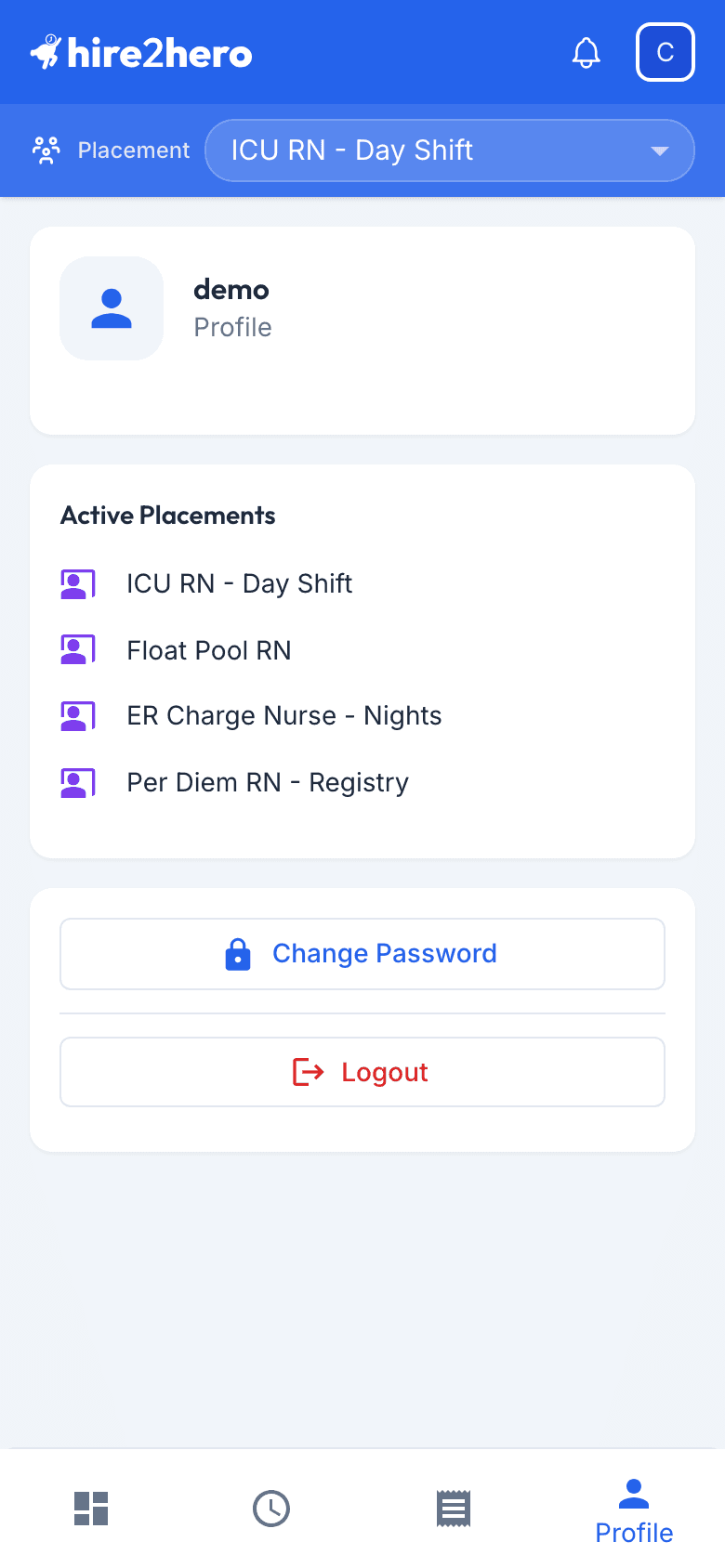
From top to bottom, the page shows:
| Section | What it shows |
|---|---|
| Account card | A person icon next to the Hire2Hero subdomain for your organization. |
| Active Placements | Each of your active placements by name. This card is hidden if you have none. |
| Actions | Change Password and Logout. |
View your placements
The Active Placements card below the account card lists all your active placements by name.
For more detail about switching placements and clock-in controls, see Viewing Placements.
Change your password
On the Profile page, tap Change Password.
Enter your Current Password, then enter your new password in Password and again in Confirm Password.
Tap Change Password. Your password is updated immediately — no email confirmation required.
Choose a password that is at least 8 characters and includes a mix of letters, numbers, and symbols. You won't be prompted to change it on a schedule, but updating it if you suspect unauthorized access is a good habit.
Sign out
Tap Logout at the bottom of the Profile page to end your session. You'll be returned to the login screen.
Signing out does not delete any of your data. Your timecards, expenses, and placements remain intact and will be there when you sign back in.
What you can't change yourself
Some account details — your name, email address, and placement assignments — are managed by your administrator. If any of this information is incorrect, contact your admin to have it updated.