
Dashboard Overview
Tour of the administrator dashboard — the summary cards, the work queues behind them, the gross profit card, and how to switch between tab and stacked views.
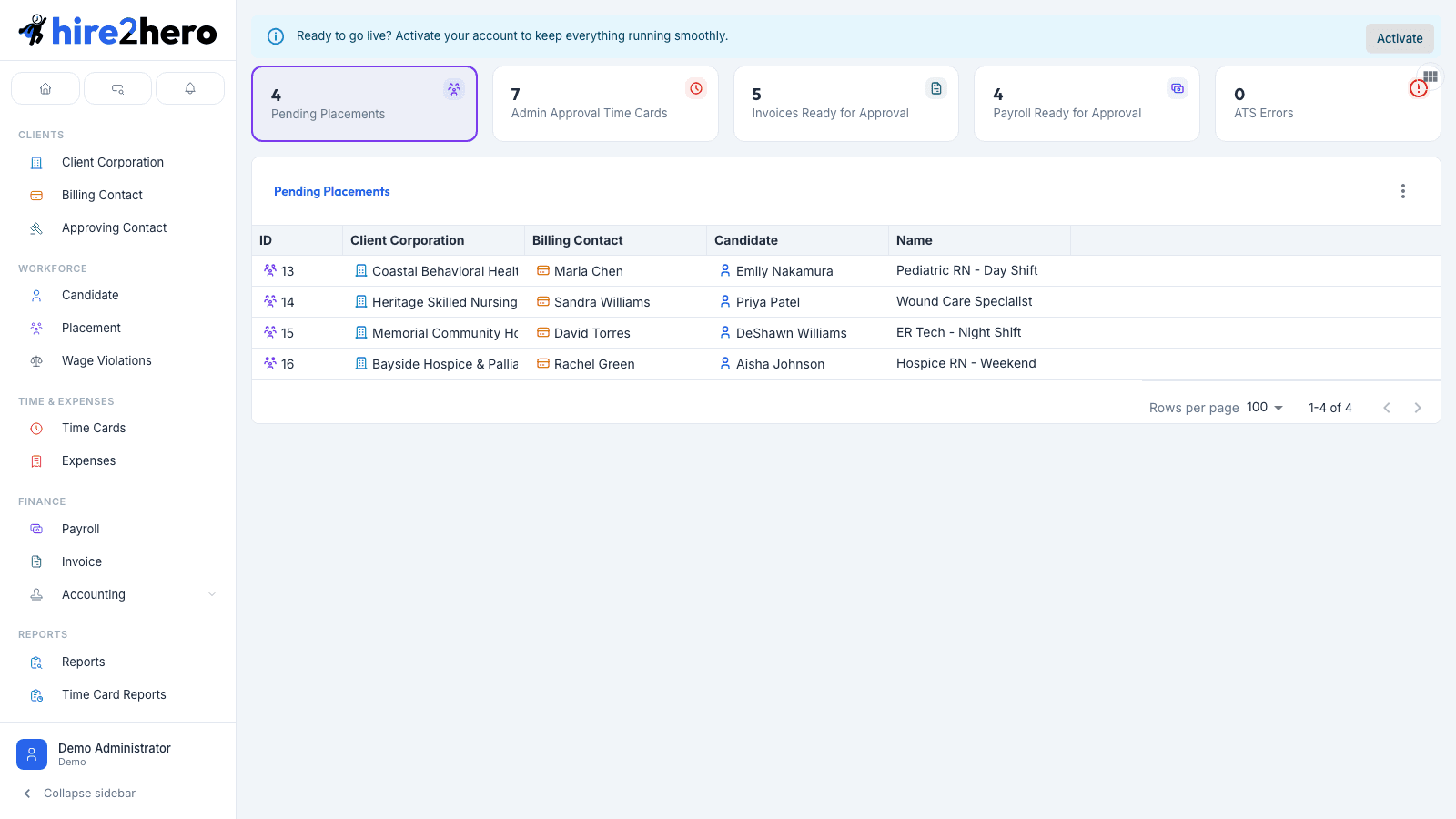
The administrator dashboard is the home base for agency staff. A row of summary cards counts the work waiting for you — placements, timecards, invoices, payroll, and ATS sync errors — and each card opens the matching work queue right below it.
The summary cards
Each card shows a live count of items in that queue. Clicking a card selects it (highlighted with a colored border) and displays that queue's table below the card row.
| Card | What it counts |
|---|---|
| Pending Placements | Placements in Pending status that haven't been activated yet. |
| Admin Approval Time Cards | Timecards waiting for your admin sign-off. |
| Invoices Ready for Approval | Invoices ready to be approved and sent to the client. |
| Payroll Ready for Approval | Payroll runs ready for final approval. |
| ATS Errors | Sync errors from your connected ATS that need attention. |
Cards are permission-based: you only see a card if your role grants write access to that entity (and the ATS Errors card requires its own dashboard authority). If a card is missing, ask whoever manages roles to review your permissions — see User Management.
Use the card row as your morning checklist — if every count shows zero, you're caught up.
Tab view vs. all-tables view
By default the dashboard works like tabs: one queue table is visible at a time, and clicking a card switches to it. The small toggle button at the top-right corner of the card row (View All Tables / View as Tabs) switches between:
- Tabs — only the selected card's table is shown.
- All tables — every queue's table is stacked vertically, useful for a full end-of-day sweep.
The work queue tables
Pending Placements
Lists placements in Pending status with columns for ID, Candidate, Name (the placement role/title), Client Corporation, and Billing Contact. Click a row to open the placement and adjust dates, rates, approvers, and more before activating it. See Managing Placements.
Pending Admin Approval Time Cards
Timecards whose client approvals are complete (or that skip client approval) and now need your sign-off. See Reviewing Timecards and Approving & Rejecting Timecards.
Invoices Ready for Approval
Invoices generated and ready to approve, with the invoice quick actions available directly from the row. See Invoicing.
Payroll Ready for Approval
Payroll entities awaiting final approval, with the payroll quick actions available from the row. See Payroll.
ATS Errors
Failed sync operations from your applicant tracking system integration. See Connecting Your ATS and Syncing Candidates.
The Gross Profit card
If your role has report access, a Gross Profit card appears at the end of the card row showing:
- The gross profit amount for the month to date (the 1st of the current month through today), alongside the margin percentage.
- Color coding for margin health: the amount turns red when gross profit is negative.
Clicking the card opens the full Margin report (also reachable from Reports → Margin in the sidebar), where you can change the date range and drill into per-client margin. If the card reads Unavailable, the margin query failed — retry by reloading, and see Reporting.
What's not on the dashboard
The dashboard intentionally focuses on work that needs action. For browsing data without an action attached, use the sidebar:
- Clients → Client Corporation for the full client list.
- Workforce → Candidate for the full candidate roster.
- Time & Expenses → Time Cards for every timecard regardless of status.
- Finance → Invoice and Finance → Payroll for full invoice and payroll history.